
Knowledge base
Unable to reach Web App after software upgrade
Reestablishing WebApp Connection After Software Upgrade
After trying to upgrade Robot Software, some users end up seeing this pop-up when trying to log back into the Web App (or an empty pop up window when trying to enable the robot in the WebApp). This is caused when the difference between the previous software version and the target version of the upgrade are too far apart, causing the web app to lose functionality.
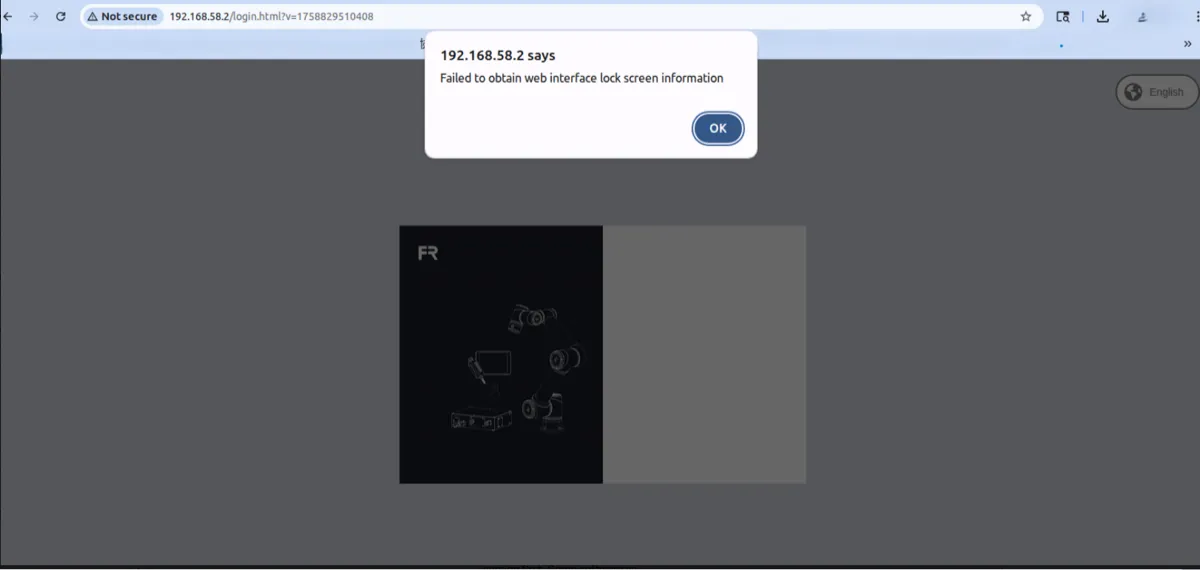
This can be solved by navigating to the secondary ethernet port on the back of the control box (defaulted to 192.168.57.2) and typing the following URL: 192.168.57.2:8050 into your web browser.
From here, you can upload the software file for the version you were previously at to restore the functionality.
After resetting the robot version, you can re-update your software to a version that is directly compatible. To check version compatibility, reference the table be
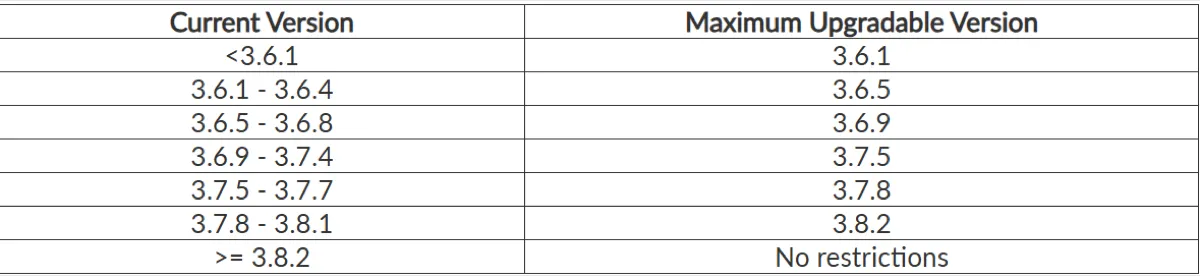
Translated from Fairino documentation. For anything safety-related, check against the equipment manual and with your advisor before moving the robot.
Still stuck?
Write to us with the serial number and what you already tried. Someone who has installed these units answers.
Request support →