
Knowledge base
Setting Up a DH Robotics AG Gripper
Setting up your DaHuan (DH) Gripper with the Fairino Robot
To set up a DH gripper to communicate through the end of arm port, you will need:
- 1 DH Gripper
- 1 Fairino Robot
- 1 8pin->5pin adapter
Step1:
Connect the cable from the gripper to the adapter cable (included in the AG gripper package). The end of this adapter cable should be a 5-pin connector that will connect to the 5-pin port on the end of the Fairino Arm
Step2:
Power on the robot and navigate to the Fairino WebApp
Step3:
Find the "Initial"->"Peripheral" -> "Adapted Device"
Select "gripper equipment" from the drop down and choose "DaHuan" as the manufacturer.
Note: The gripper model may not match. That is okay! The register mappings for the AG are the same as the DH default device
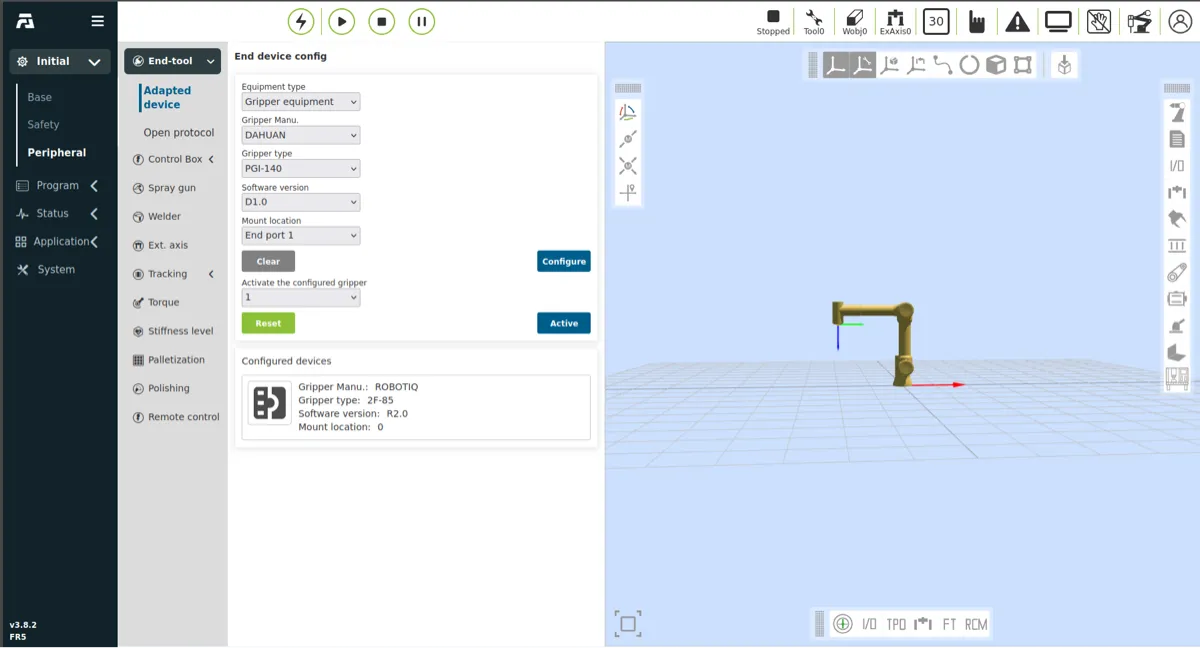
Figure 1: The navigation page for the gripper in the web app
Step4:
Click on "Configure"->"Active" to finish the set up. Now, you should see it in the right hand panel of your WebApp window.
Translated from Fairino documentation. For anything safety-related, check against the equipment manual and with your advisor before moving the robot.
Still stuck?
Write to us with the serial number and what you already tried. Someone who has installed these units answers.
Request support →